Tool calling and agents
LLMs don’t have access to live data
LLMs are trained on a “fixed” data set (i.e., they have a “knowledge cutoff”).
I don’t have the ability to check real-time weather data.
LLMs don’t have access to live data
LLMs are trained on a “fixed” data set – providers typically refer to this as a “knowledge cutoff”.
Three main techniques:
- Prompting: supply knowledge to system prompt. Simple, but it doesn’t scale well.
- RAG: retrieve relevant information based on user prompt.
- Tool calling: define a tool that can access knowledge, and let the model call it.
RAG is a popular term, but the core idea is outdated. Now you would supply a tool that can retrieve relevant information, and let the model call it.
Tools = functions + metadata
Tools = functions + metadata
Note that:
- Type hints are required — the model uses these to know what arguments to pass.
- Docstring is required — this is how the model understands what the tool does.
Now the LLM can get the current weather
How tool calling works
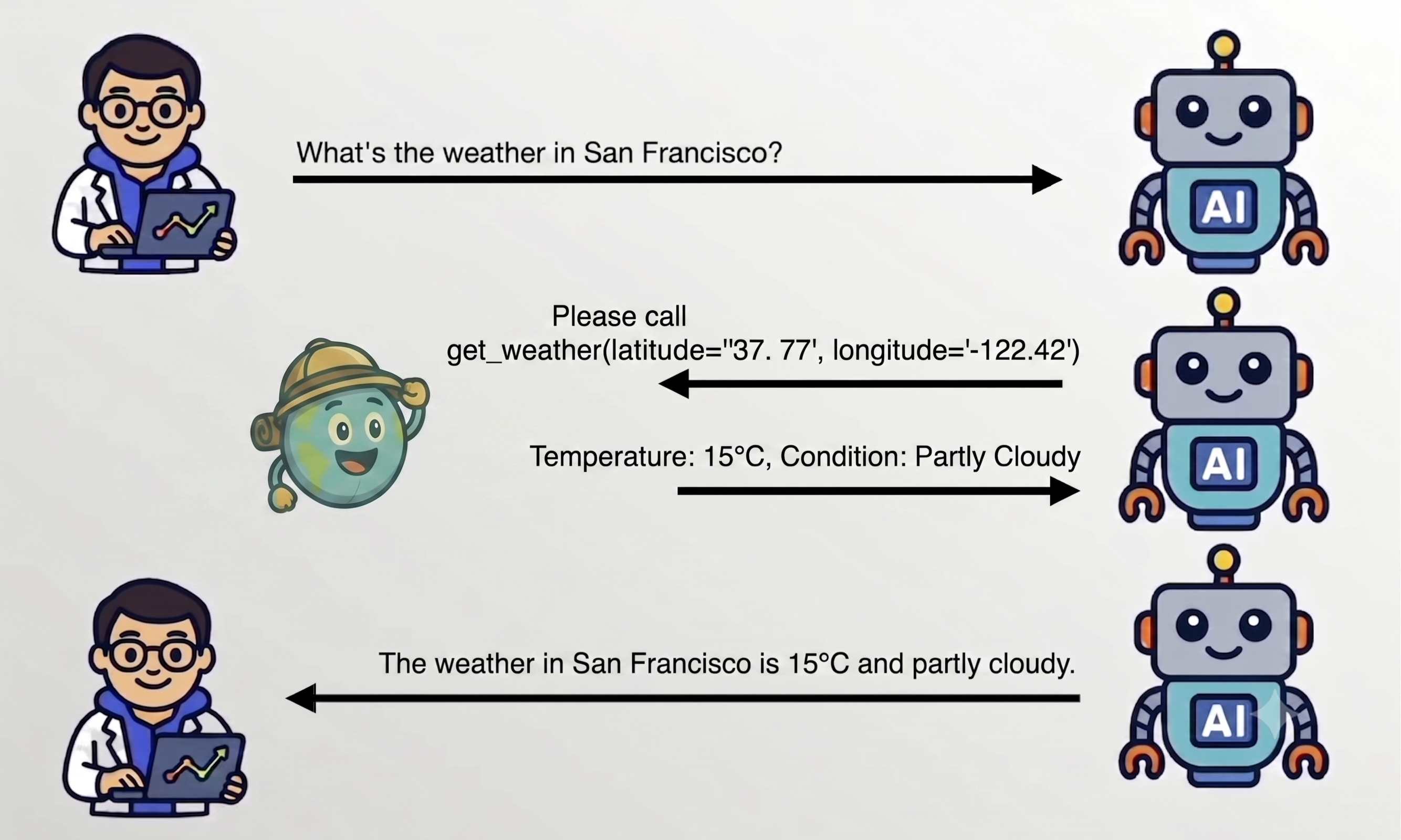
The tool loop in detail
- User sends: prompt & tool metadata
- Model responds: call
xtool withyarguments - chatlas invokes: function with those arguments
- chatlas sends: result back to the model
- Model responds: with a natural language answer
- Steps 2–4 can repeat — the model can call multiple tools in sequence.
- Model can “gracefully recover” from errors: if failure occurs, the error is sent back to the model.
Exercise
- Open up
exercises/chat-tools.py. - Write a python function that reports the current date.
- Register it as a tool and call it from chat.
- Add another tool that takes Python code as input and
eval()it.
Agents: LLM + tools + loop
- Tools are a means by which LLMs both learn & alter the state of the world.
- This “weather agent” is safe, but not very capable.
- LLMs are very good at generating code – what if the model could write and execute code?
- Key idea: define a tool that takes code as input and executes it.
⚠️ This is a illustrative example — never execute arbitrary code in production without proper sandboxing and security measures.
Guardrails for code execution
Three main strategies to mitigate risk:
- Use a sandbox to isolate the execution environment.
- Warning: here be dragons — this is a hard problem.
- Leverage remote tools to execute on a separate process or server.
- Major LLM providers have code execution tools.
- Restrict the scope of what can be executed (e.g., read-only SQL).
- This is the approach used by querychat.
- Can also lead to model getting “less creative”, which can be a good thing for correctness.
- Especially relevant for web apps other people are driving.
Remote tools
- Tools don’t have to live in the same process as the LLM client.
- They can be:
- Provider: the LLM provider provides tools that run on their servers
- MCP: serve tools through a web service or local process.
- Remote tools can be implemented in any language, not just Python.
Provider tools
chatlas comes with some “built-in” tools that use the provider’s native capabilities.
These currently include:
tool_web_search()— search the web for current informationtool_web_fetch()— read a specific URL
MCP tools
MCP tools can be served through either:
- HTTP — the tool is served through a web service (e.g., DeepWiki)
MCP tools are async, which means you must also use .chat_async() to call them.
MCP tools
MCP tools can be served through either:
- HTTP — a web service (e.g., DeepWiki)
- STDIO — a local process (e.g., uvx)
Is MCP dead?
- Some argue CLIs are better and more efficient than MCP.
- There is some truth to this, but it also assumes you’re ok with arbitrary commands running in the terminal.
- MCP is safer since it reduces the risk surface, making it a better fit for web apps.
Exercise
- Go to https://www.pulsemcp.com/servers.
- Click on Filters -> “Remote Available”.
- Sort from most popular.
- Pick an MCP server.
- Open
exercises/chat-mcp-tools.py. Tweak it to use the MCP server you picked.
Bonus: knowledge retrieval
- Agentic search (i.e., tools to web search, read files, etc) gets you a long way, but not necessarily efficient.
- Common pattern: “Agentic RAG”
- Pre fetch/index knowledge into an efficient storage system.
- Supply a tool for LLM to retrieve from it.
- This is using
raghildafor thestore. Learn more here.